

Free tools
Free security tools for your team
See whether criminals can fake email from your business, score your security in two minutes, find out if a password has been leaked, see what IT downtime really costs, check whether your systems are still supported, check a suspicious attachment before anyone opens it, give everyone a desk card that tells them what to do when something looks wrong, and learn to spot this month’s phishing trick. Free, no sign-up.
Can criminals fake your email?
Type your business email or domain. In seconds you get a grade on the three settings that stop criminals from sending email that looks like it came from you.
The list of services allowed to send email as you.
A tamper-proof signature on every message you send.
Tells other mail servers what to do with fakes: deliver, junk or reject.
How secure is your business? Two-minute self-assessment
Ten yes-or-no questions about the protections that stop most attacks on small businesses. Answer honestly. "Not sure" is a useful answer too.
Has my password been leaked?
Check a password against more than a billion passwords exposed in real data breaches. Criminals try these first, so a leaked password should never be used again, even if it looks strong.
What does downtime cost you?
When the network, email or a key system goes down, payroll keeps running. Adjust the numbers to match your office and see what IT problems really cost each year.
This counts only lost work time and revenue. It leaves out overtime to catch up, missed deadlines, unhappy customers and the cost of a fix, so the real number is usually higher.
Is it still supported?
Once a product reaches end of life, the maker stops fixing security holes in it, and attackers know it. Pick what you run to see whether it still gets security updates.
Dates come live from the community-maintained endoflife.date database, which tracks each maker's published lifecycle.
Is this attachment safe?
Check a file against dozens of antivirus engines on VirusTotal before you open it.
If VirusTotal says "Item not found," use Upload it to scan and drop the same file on VirusTotal's page for a fresh scan. Uploaded files are shared with security companies, so never upload anything confidential. Forward those emails to us instead.
Don't open it. Delete the email and call us. Already opened it? Unplug from the network first.
Nobody has uploaded this exact file before. Upload it for a fresh scan if it isn't confidential, or forward the email to us.
The file is probably fine. Still watch for links inside it and any page asking you to sign in.
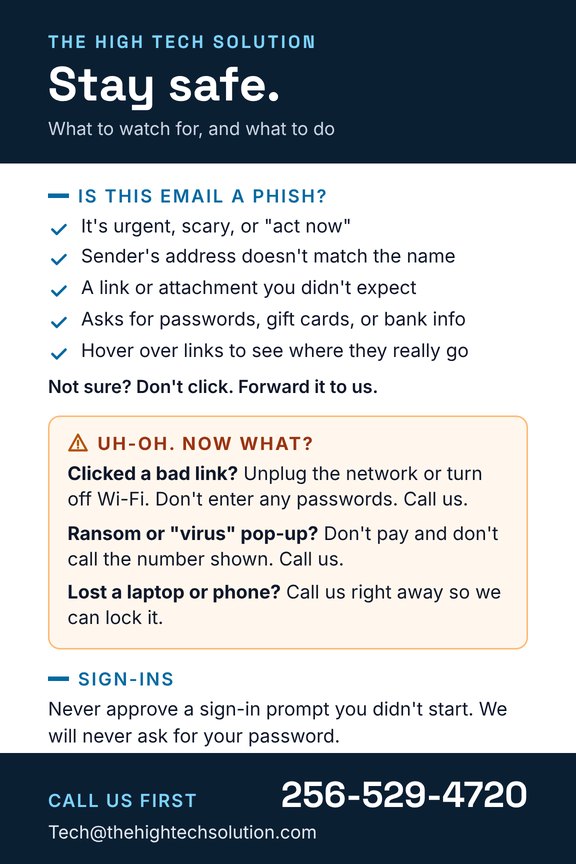
The Workday Survival Card
A two-sided 4×6 cheat sheet your team will actually keep on their desk.
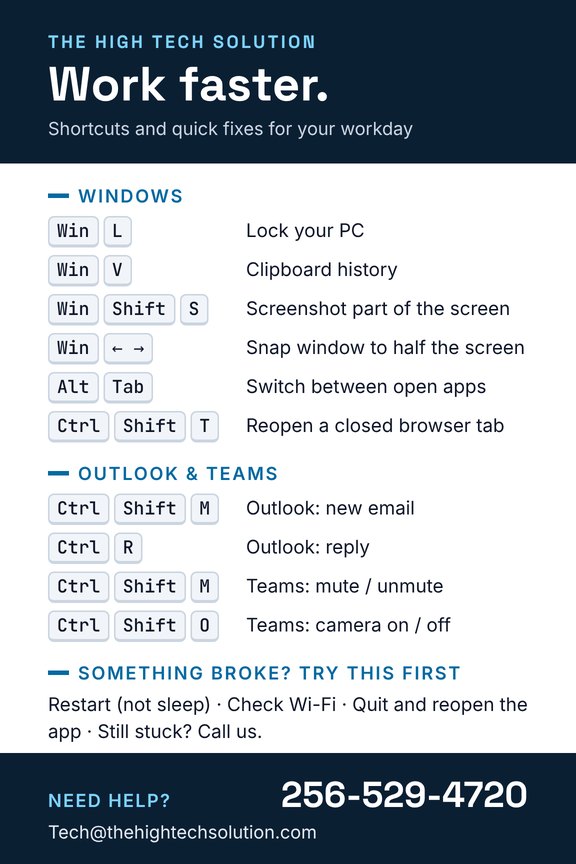
- Work faster: the Windows, Outlook and Teams shortcuts people don't know
- Spot a phish in five seconds
- Know what to do after a bad click, a ransom pop-up or a lost laptop
Want laminated copies for your office? Call 256-529-4720.
Phish of the Month · November 2026
The “documents awaiting signature” QR code
A real-world style of attack we’re seeing right now, cleaned up so it’s safe to study. Tap a number to see each warning sign.
Hello,
You have (2) pending documents shared with you via SharePoint:
Q4 Payroll Adjustment.pdf
For your security, scan the code below with your mobile device to review and sign.
Access expires in 24 hours. Unreviewed documents may result in mailbox suspension.
Thank you,
IT Security Team
- The sender isn’t Microsoft. Real Microsoft mail comes from microsoft.com. “m365-secure-docs.com” is a lookalike anyone can register.
- Manufactured urgency. “Expires today” is there to rush you past thinking.
- No name. A real document share says who sent it and greets you by name.
- Tempting bait. “Payroll” makes almost anyone curious. Nobody told you to expect it.
- The QR code is the trap. It moves you to your phone, outside your company’s email filters, and hides the real web address. It leads to a fake Microsoft sign-in page.
- A threat. Real IT doesn’t suspend mailboxes over unread documents.
- A vague signature. No name, no phone number, no way to check.
- Don’t scan it. Use your mail’s Report button, or forward it to your IT provider.
- Expecting a document? Open SharePoint or OneDrive yourself instead of using the email.
- Already scanned it and typed your password? Change it right away and call us. Every minute counts.